Vrosa Service
Look after customers after the job.
Service keeps what happens after the work in one place: customer replies, callbacks, feedback and the customers who need attention, all on the same record as the job.
From a finished job to a customer who comes back
- 1
Finished work
The job is done and on the customer record.
- 2
Customer replies
Replies come back to one inbox.
- 3
Callbacks and issues
A question or a warranty problem, tracked until it is resolved.
- 4
Feedback
How the customer said the work went.
- 5
Customers who need attention
Who to call back, and why.
Illustrations show the direction of the system. Guided demos focus on customer records and estimate follow-up.
A finished job is not the end of the relationship
After the work is done, customers call back, reply to a message, ask about a warranty or quietly decide not to book again. When those moments live in separate places, someone has to remember them.
Service builds on the customer record, so the next person to pick up the phone sees the whole story: the jobs, the estimates, the open tasks and what the customer said last.
- Callbacks and issues tracked until they are resolved
- Feedback recorded against the job
- A clear view of who needs attention
Service
- No callback slips through
- Record how customers say the work went
- See who needs a call back
- Stay on the same customer record
Look after the customer
Three connected parts, all built on the customer record.
Illustrations show the direction of the system. Guided demos focus on customer records and estimate follow-up.
Track a callback, a warranty problem or a complaint until it is resolved, with an owner, a priority and a due date.
Callbacks and issues
- An owner and a due date on each one
- A thread of notes on the customer
- Kept for your team: nothing goes to the customer
Callbacks and issues
- An owner and a due date on each one
- A thread of notes on the customer
- Kept for your team: nothing goes to the customer
Callbacks and issues
Track a callback, a warranty problem or a complaint until it is resolved, with an owner, a priority and a due date.
Customer feedback
- You ask in person or by phone
- Recorded against the job
- See who needs a call back
Customer feedback
Record how a customer said a finished job went, then see the average and who needs a call back.
Customers who need attention
- The reasons are always shown
- Based on your own records
- You decide what to do next
Customers who need attention
See which customers may need a call: a low rating nobody followed up on, an invoice past due, or a year with nothing done and nothing booked, with the reasons shown.
Built on the Vrosa customer record
Service starts from the replies, records and tasks already in Vrosa.
Screens show example data from one kind of business, a heating and cooling company. Your own customers, services and fields would appear in the same places.
Customer replies to your estimates land in one inbox, with what needs attention first.
Explore estimate follow-up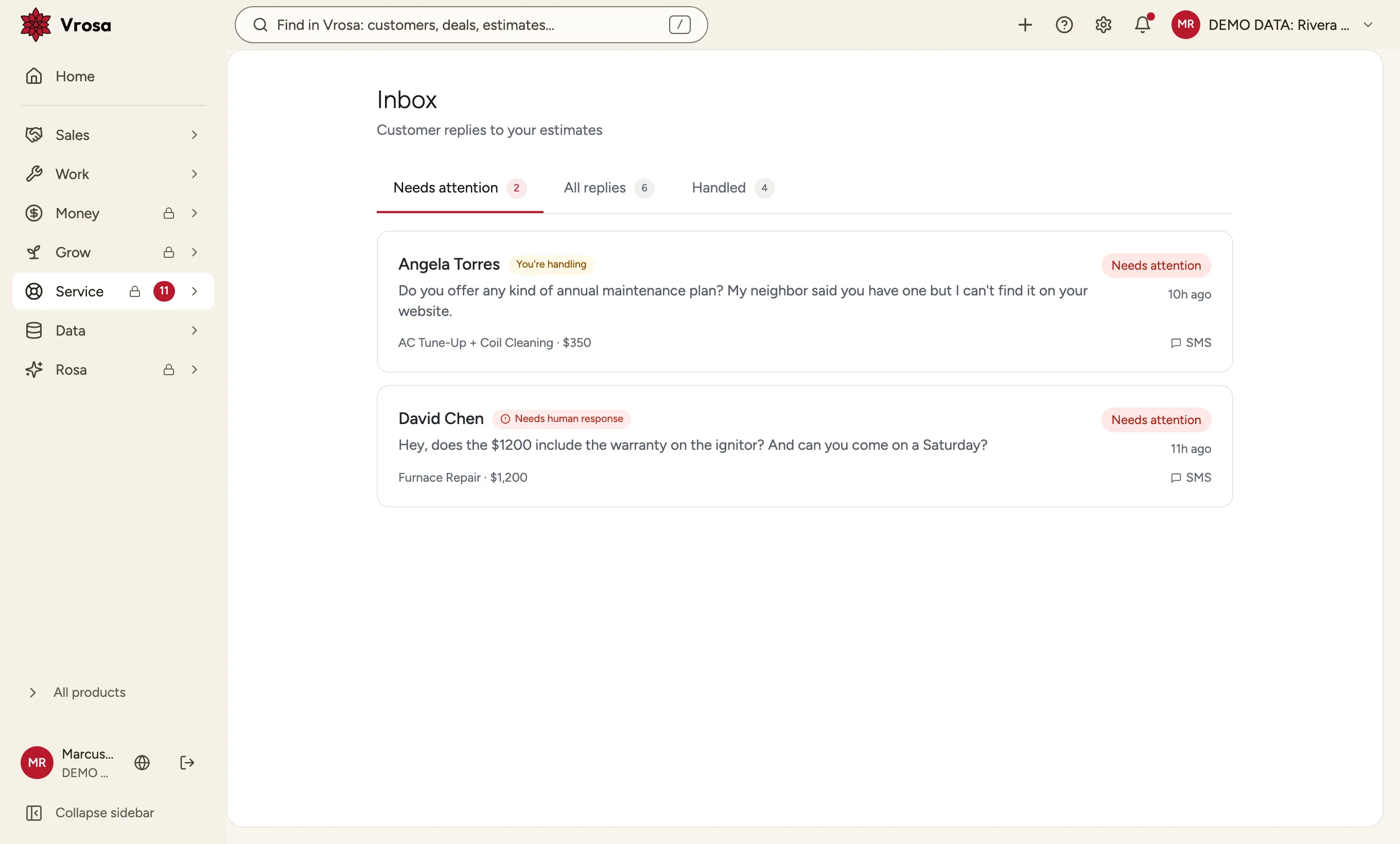
One inbox for replies
Customer replies to your estimates land in one inbox, with what needs attention first.
Explore estimate follow-up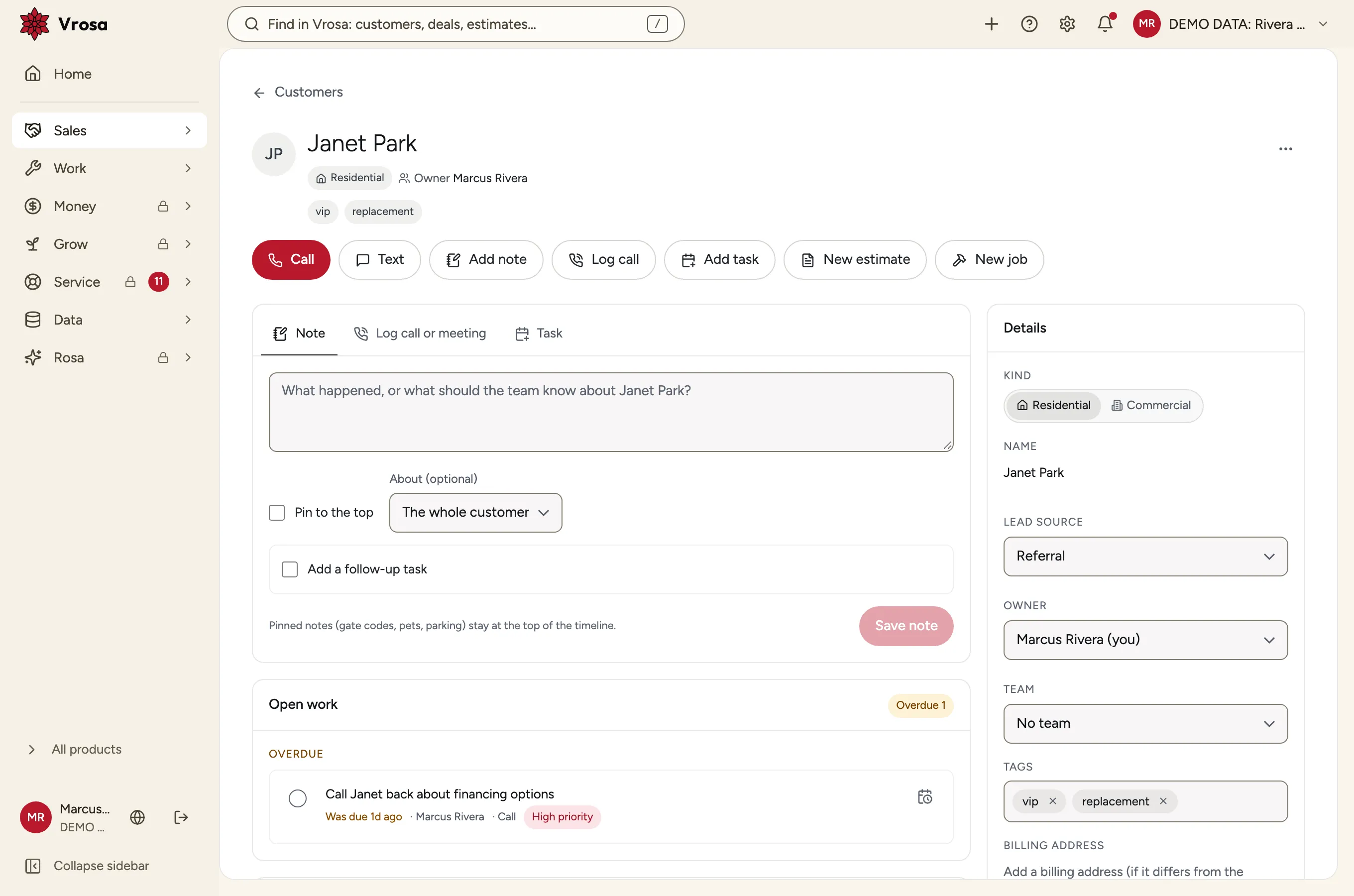
The whole story of a customer
Notes, calls, tasks, messages and estimates sit on one timeline, open work first.
Explore customer records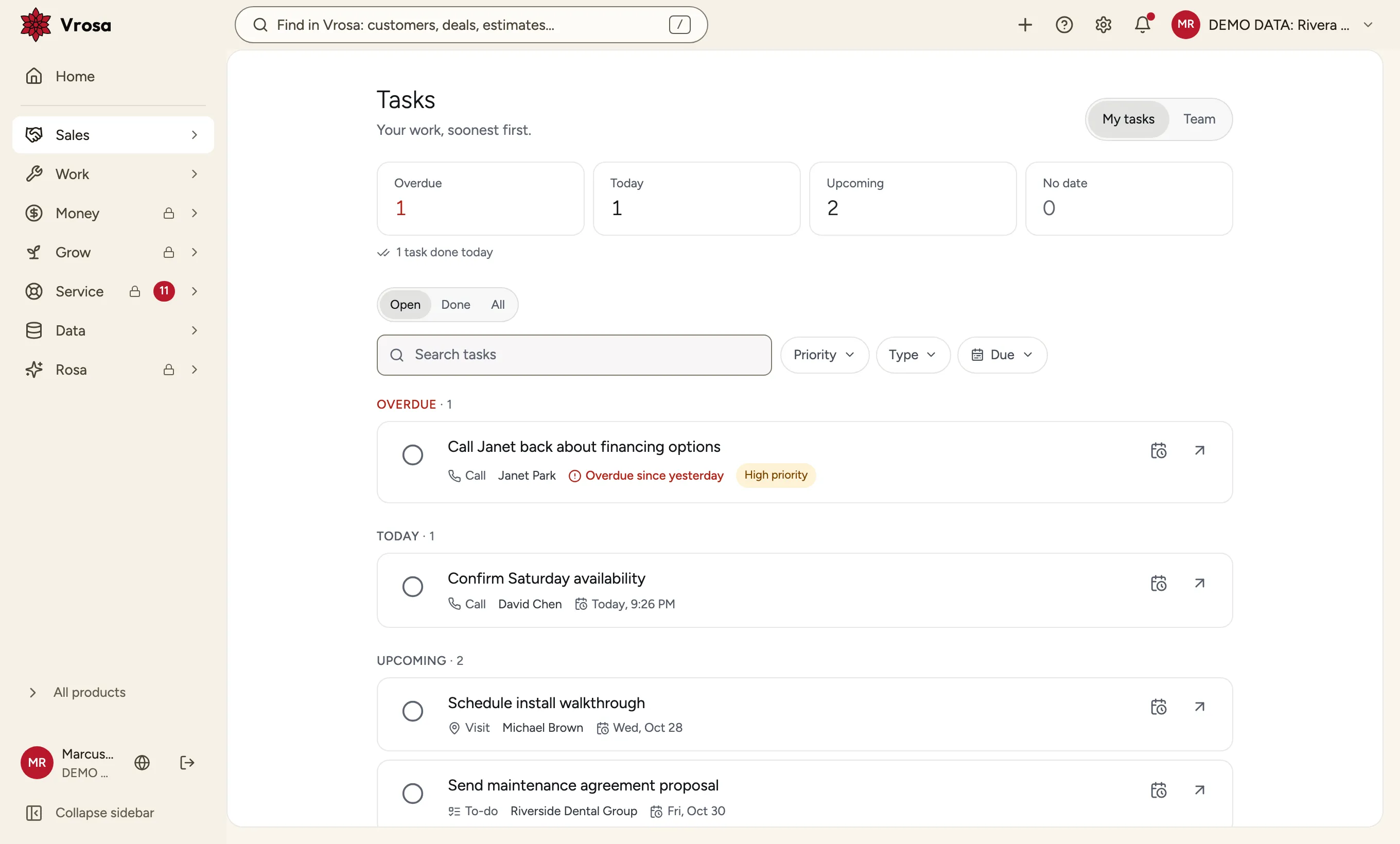
Tasks with an owner and a due date
Add a call-back as a task on the customer, with an owner and a due date, and see overdue work first.
Tell us what happens after your jobs
We are listening closely. Tell us how callbacks, warranty questions and feedback are handled in your business today.
Nothing a customer says goes unheard
Because Service sits on the same record as the work, anyone who picks up the phone sees the whole story first.
One record
The jobs, estimates and notes together.
An owner on each issue
So a callback does not wait for someone to remember.
For your team
Notes and issues stay inside Vrosa.
Part of one connected system
Every area of Vrosa builds on the same customer record.
CRM
Customers, people and places in one record.
Explore CRMOperations
Jobs, appointments, scheduling and dispatch.
Explore OperationsEstimate follow-up
Bring quiet estimates back into the conversation.
Explore estimate follow-upCustomer records
The whole story of a customer on one page.
Explore customer records
Questions
What does Service cover?
Callbacks and warranty issues, customer feedback and which customers need attention, all on the customer record.
What can I see in a demo?
Guided demos focus on the inbox, customer records and tasks that Service builds on. Customer messaging runs in demo mode. Ask us what is ready to show.
Will customers be messaged automatically?
No. Notes and issues are for your team, and nothing is sent to customers from them. Customer messaging runs in demo mode.
Where is Service heading?
The direction includes a customer portal, a shared help desk, website chat, calling, surveys and response-time promises. These are not part of what guided demos show.